Skip to content
BidHarmony

Advertising intelligence & automation

Every ad dollar, every channel, one console.

Spend goes out through Amazon, Google, Meta, Walmart and Pinterest. Revenue comes back through Seller Central and Shopify. BidHarmony puts all of it in one place — and lets you act on it without opening seven tabs.

Access is limited to active DEFY Creative & Co. clients. Request an account →

bidharmony.defycommerce.co
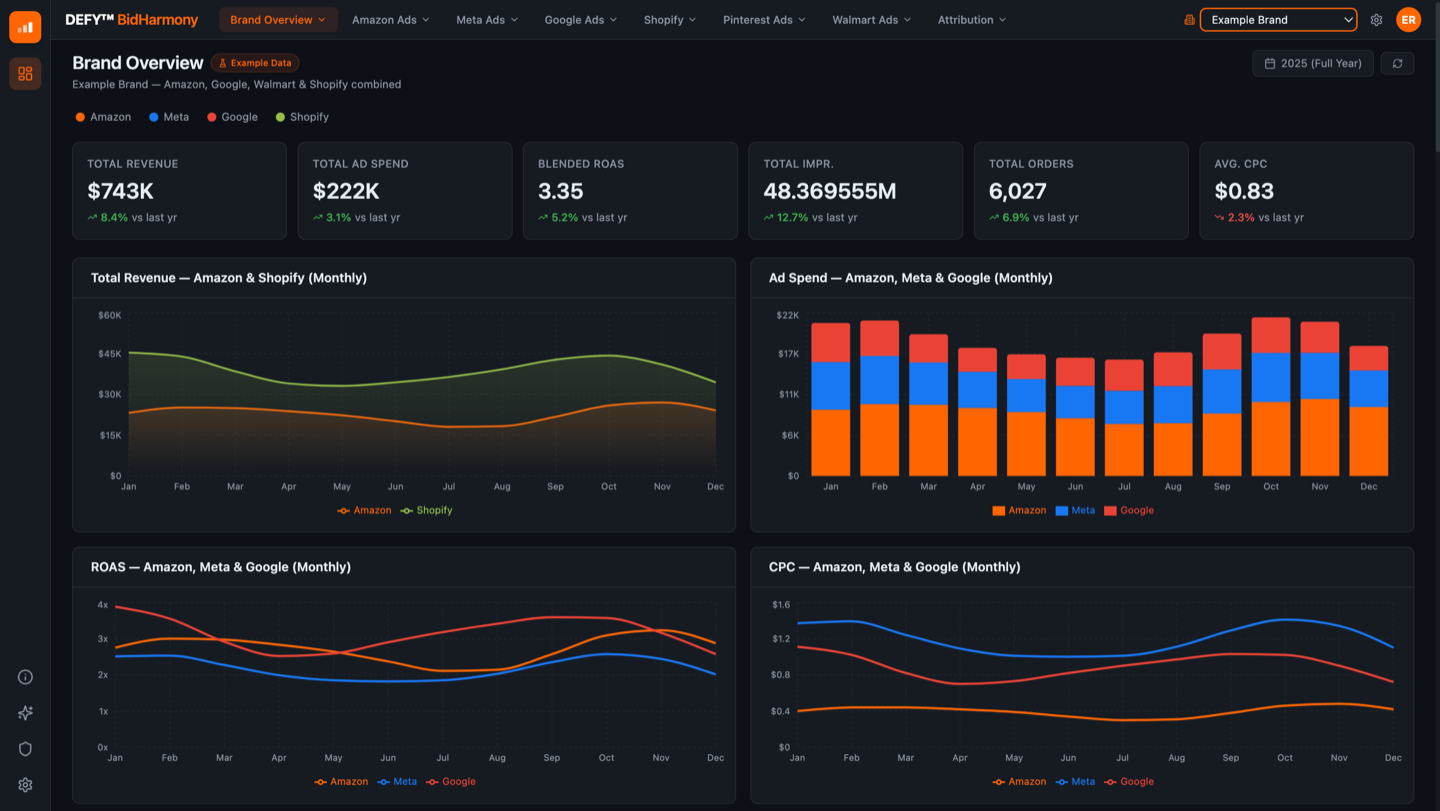
The BidHarmony Brand Overview dashboard: a row of KPI tiles showing total revenue, ad spend, blended ROAS, impressions, orders and average CPC, above four monthly charts comparing Amazon, Meta, Google and Shopify.
Brand Overview, shown with example data — Amazon, Meta, Google and Shopify side by side in a single view.
Ad platforms
5Ad platforms
Revenue & search sources
3Revenue & search sources
Amazon data grain
HourlyAmazon data grain
Rules running
24/7Rules running

Connects to

  • Amazon Ads
  • Google Ads
  • Meta Ads
  • Walmart Ads
  • Pinterest Ads
  • Shopify
  • Amazon Seller Central
  • Google Search Console

The problem

The decision happens in a spreadsheet. Late.

Almost nobody sells on one platform anymore. Each one has its own dashboard, its own definition of a conversion, and its own idea of what a good day looks like.

Without BidHarmony

Seven tabs and a stale export

The real work — deciding where the next dollar should go — ends up happening in a spreadsheet, from numbers that were already stale when they were pasted in.

Platforms disagree about who earned the sale. History rolls off after 30 or 60 days. A bid moved last month, and nobody can say which rule moved it or why.

With BidHarmony

One place, and it acts

Every connected channel rolls into a single picture: spend, sales, ROAS and the share each platform is carrying. Drop into any platform's own dashboard for detail — same metrics, same date ranges, nothing to mentally translate on the way down.

Then the rules you write once keep working overnight, and every change they make is written down with the old value, the new value, and the reason.

How it works

Connect once. Decide continuously.

  1. Step 01

    Connect your accounts

    Authorize the ad platforms you spend on and the storefronts you sell through. BidHarmony backfills history on the way in, so the first chart you see already has a past.

  2. Step 02

    Write the rules once

    Set the conditions that matter to you — bid targets, placement adjustments, dayparting windows, harvest and negative criteria — and choose how often each one runs.

  3. Step 03

    Review what changed

    Approve changes in one queue, or let them run and read the digest. Every change lands in Deploy History with its old value, new value and cause — and can be undone.

Questions

Frequently asked questions

Who can use BidHarmony?

Access is currently limited to active DEFY Creative & Co. clients. There is no self-serve signup — if you are a client who needs an account, your account manager can set one up.

Do we have to move off our current ad platforms?

No. BidHarmony sits on top of Amazon, Google, Meta, Walmart and Pinterest through their own APIs. The campaigns stay where they are; every change BidHarmony makes is a change in the real account.

What happens to data if we disconnect a platform?

Syncing stops and the history already collected stays. Past reporting does not disappear along with the token.

Can the automation run without approval?

Per rule. A new rule usually starts in the review queue and gets promoted to unattended once its behaviour is predictable. Either way every change is recorded with its cause and can be reversed.

Is our data mixed with other brands'?

No. Connections, warehouse data and rules are scoped per brand, and switching brands switches the whole console rather than filtering one shared view.

Access

Ready when you are

BidHarmony access is currently limited to active DEFY Creative & Co. clients. If you already have an account, sign in. If you're a client who needs one, contact your account manager and we'll set you up.